
Great tools for working on your publication
Boost your authoring process
Main features:
-
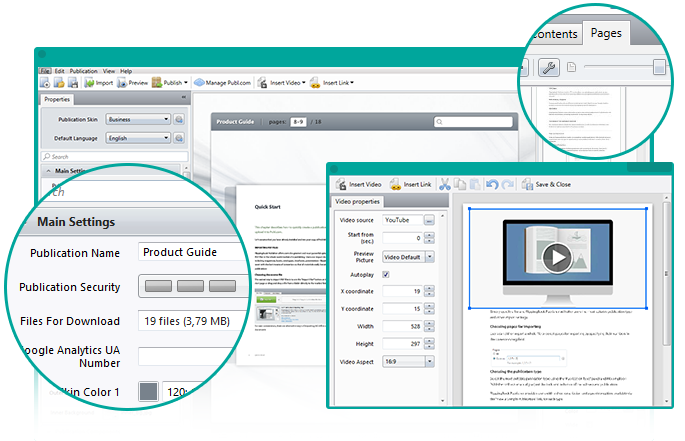
Embed video procorpTo embed a video into you publication, press the "Insert Video" button, paste a YouTube or Vimeo video URL and adjust the area where the clip will appear. The whole process takes no more than 5 minutes. No complex adjusting, no time wasting.
-
Create & edit links procorpIf your document doesn't have links, you can add them right in the application. Press the "Insert Link" button, chose the area of the link - it could be a word, a picture or some random area on your page - and paste the URL.
-
Page numerationPage numeration can be customized in any way you need. The offset settings allow you to start from any page. You can also replace numbers with words or symbols, and exclude the cover and front fly page from the numeration.
-
Localization supportDesktop application supports 11 languages (English, German, French, Italian, Spanish, Portuguese, Dutch, Swedish, Russian, Japanese and Simplified Chinese), making it easy for you to learn to use the application.
-
Publication settingsA wide range of publication settings will help you create a unique publication using only the tools and features you need. You can fine-tune the visual elements or enable/disable certain options, such as Google Analytics, Branding Settings, Table of Contents and etc.
-
Google AnalyticsIf you want to monitor your publications' visitors, you don't have to fidget with all the settings or add something to the code. Just add your Google Analytics UA number in the appropriate window and watch the dynamics. It's easier than you can imagine.
Extended features:
-
RTL supportFor users of right-to-left languages, Publ.com has an RTL option allowing you to create realistic right-to-left publications. This feature will help you engage a greater audience in different regions.
-
Quick previewYou don't have to upload your publication to see how it performs on different devices. Click the "Preview" button and test your materials on desktop and mobile devices.
-
ToC editorThe table of contents can be automatically imported from your source PDF. If the source file doesn't contain a ToC, you can create it manually right in the application.
-
Files for downloadSupplement your publication with additional files. It can be an original PDF or any other file you want to give to your readers - images, documents, audio files, etc.
-
Save settingsWant to give several of your publications the same style? Save the settings of the publication you just created and apply them to your further projects.
Beth Anderson:
The integrated video feature allows us to add TV commercials to the ad pages. We had to be able to customize the interface and maintain a premium luxury feel in the finished product. 
Tiffany London:
We have seen the product evolve with the new features that are essential to us, such as the ability to insert links to external content - for example, websites or videos.