
Various publishing options
Select the desired destination and publish with one click
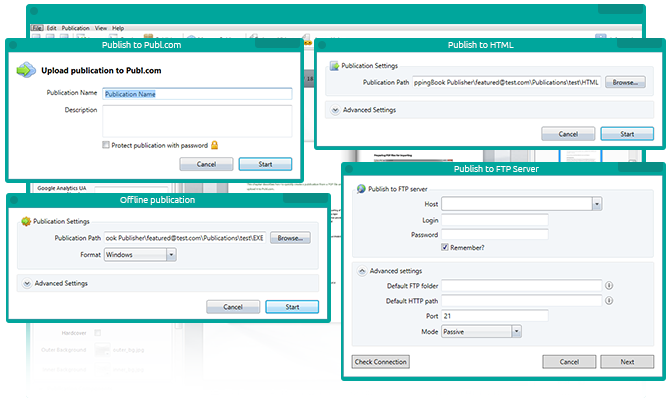
Main features:
-
Cloud publishingAs soon as you’re done creating your publication, you can easily publish it to Publ.com cloud and start distributing. One of Publ.com’s strongest features is a user-friendly administrative interface that’s available both in the application and browser.
-
Publish to HTMLSave your publication locally to publish it on your servers later or to send it to your colleagues via a corporate network. This feature is useful in many individual cases. In most cases, we suggest using Publ.com cloud hosting.
-
FTP client & smart FTP updateIf you are used to storing all your documents on your own FTP, Publ.com gives you the freedom of choice. You can publish materials to your FTP from the desktop application with one click. The only thing you have to do is adjust the settings.
-
SEO versionYour publications can be found on Google, Bing, Yahoo!, etc. thanks to the included SEO option. It starts working for you from the very first moment it’s uploaded. You can also disable this option if you don’t want publicity.
-
Exe version procorpWant to distribute your publication on CD/DVD/Flash Drive as a part of corporate gift or press kit? Create an offline version in the application, burn it on physical media, add a version for Mac users (if you're not sure they are using a PC), and it's ready.
-
Mac version procorpFor offline distribution, the Publ.com application has a Title feature. Create an offline version of your publication for Mac users. Please note that an online publication opens on Macs (and mobile devices) automatically, without any action on your part.
Frederik Blouin:
When we looked for other software available on the market for publishing content online, we noticed that it was not easy to use, was buggy and not compatible with mobiles. 
Jim Ackert:
We were able to publish on our website some of our children’s DVDs and printed storybooks as talking flipbooks and coloring books.